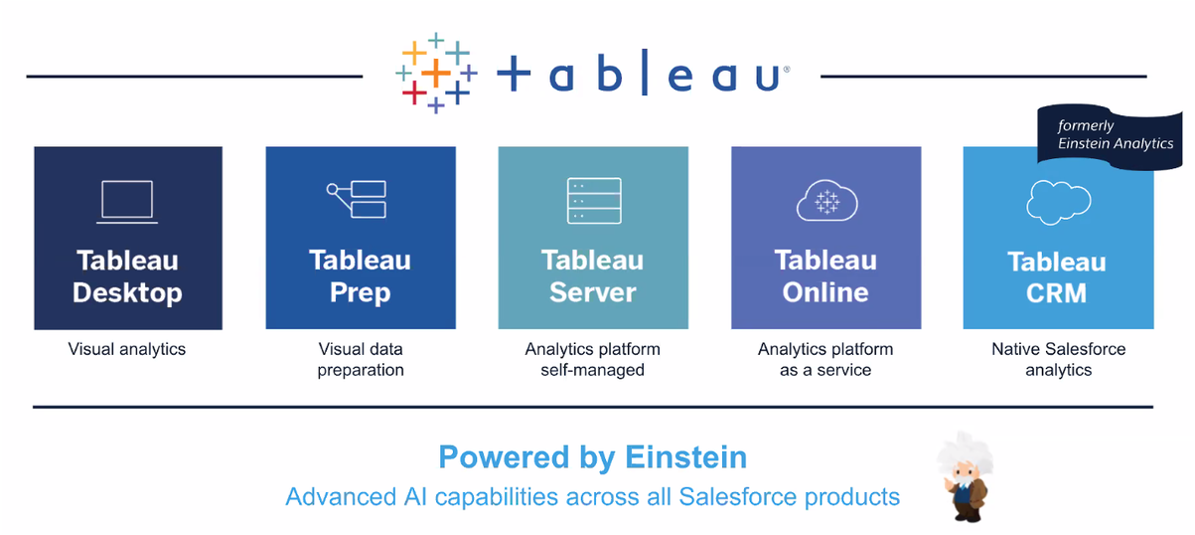
Tableau Products
Tableau is a tool that drives intelligent predictions and recommendations across your analytics to power data-driven action.
Integration with Salesforce (Exclusive)
Tableau is known as CRM Analytics in Salesforce, providing Tableau features directly within Salesforce.
Licenses
| License | Description |
|---|---|
| Tableau Creator | Connect your data, build vizzes, and publish dashboards in Tableau Desktop. |
| Tableau Explorer | Edit existing dashboards, available for teams and organizations. |
| Tableau Viewer | Access existing dashboards, available for teams and organizations. |
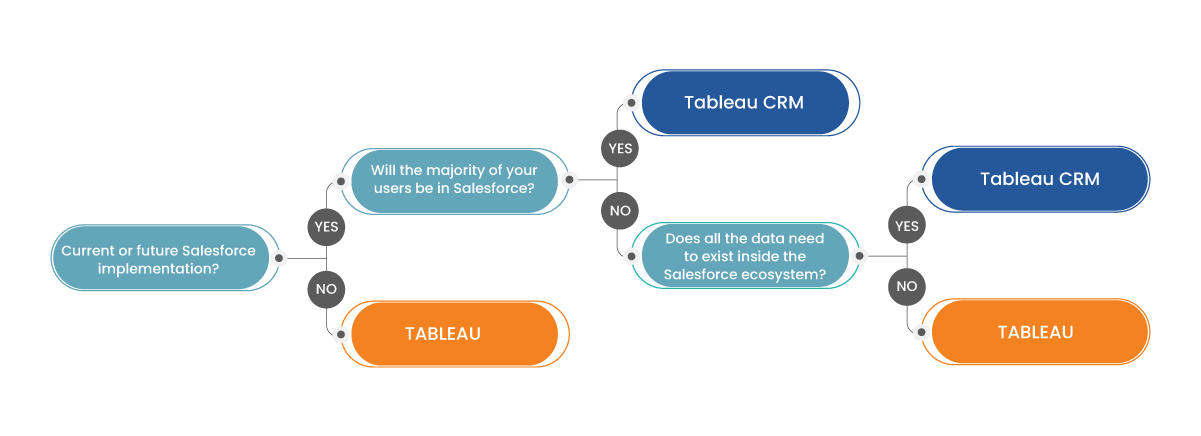
Choosing Between Tableau and CRM Analytics
CRM Analytics
CRM Analytics uses a specific connector designed to connect Salesforce and Tableau. It's accessible via the Salesforce mobile app or the unique CRM Analytics app.
Licenses
| License | Description |
|---|---|
| CRM Analytics Growth | Basic, provides 100M rows per license. |
| CRM Analytics Plus | Provides more data, 10B rows per license. |
For external users, the CRM Analytics for Communities permission set license is required.
CRM Analytics Limits
| BASELINE ROW ALLOCATION | ALLOCATED ROWS |
|---|---|
| CRM Analytics Plus | 10 billion |
| CRM Analytics Growth | 100 million |
| Sales Analytics | 25 million |
| Service Analytics | 25 million |
| Event Monitoring Analytics | 50 million |
| B2B Marketing Analytics | 25 million |
| CRM Analytics for Financial Services Cloud | 25 million |
| CRM Analytics for Health Cloud | 25 million |
| Extra Data Rows license | 100 million |
API Call Limits
Apply to all supported editions
| API Call | Limit |
|---|---|
| Maximum concurrent CRM Analytics API calls per org | 100 |
| Maximum CRM Analytics API calls per user per hour | 10000 |
Note
When using a Salesforce local input connection, CRM Analytics bulk API usage doesn’t count towards Salesforce bulk API limits. The use of external Salesforce connections and output connection impacts your limits. The dataflow submits separate bulk API calls to extract data from each Salesforce object, utilizing a batch size of 100,000–250,000. For instance, to extract 1 million rows from an object, the dataflow creates 4–10 batches.
Connect and Sync Your Data to CRM Analytics
CRM Analytics connectors facilitate easy data connections inside and outside of Salesforce. It provides a prebuilt connector for data in your local org and various configurable connectors for remote data in external Salesforce orgs, apps, data warehouses, and database services.
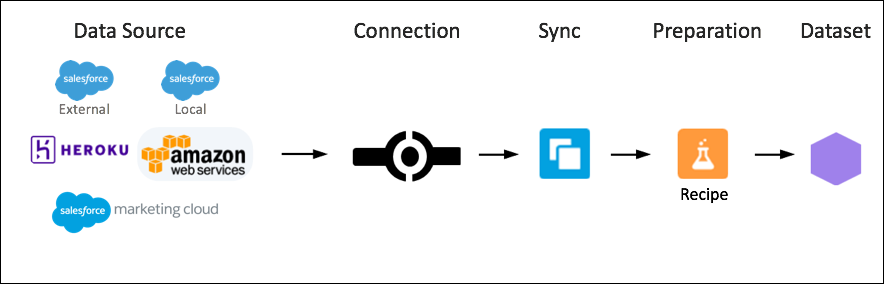
Example Salesforce Connectors: - Salesforce External Connection - Salesforce Marketing Cloud Connection - Tableau Online Connection - Database connections - Heroku Postgres - SAP HANA - etc
Data Access and Visibility
In CRM Analytics, if a user has access to a dataset, they have access to all records in the dataset by default. To restrict access, you can implement row-level security on a dataset using sharing inheritance and security predicates. Sharing inheritance automatically applies a Salesforce object’s sharing logic to the dataset’s rows. A security predicate manually assigns filter conditions defining dataset row access.
Schedule, Run, and Monitor Data Sync
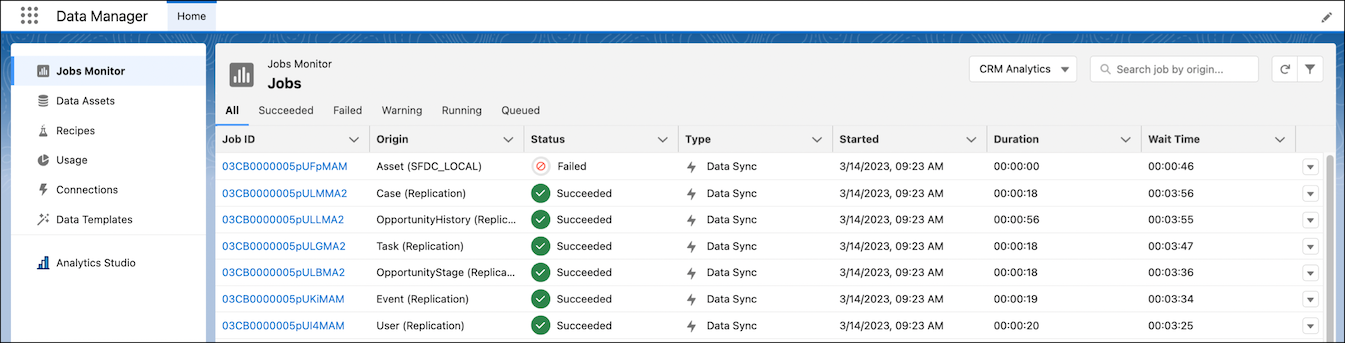
CRM Analytics allows scheduling automatic syncs, manual sync runs, and monitoring sync progress in the data manager.
Note
For CRM Analytics Plus license holders, schedules can be set to run every 5, 15, 20, or 30 minutes.
Data Manager
The data manager is where you monitor data jobs, prepare datasets with recipes and dataflows, and connect to data.
| TAB | USAGE |
|---|---|
| Jobs Monitor | Monitor and troubleshoot jobs, such as running recipes. |
| Data Assets | View data sources, including datasets and connected objects usable in recipes. Upload CSV files to access other data sources lacking prebuilt connectors. |
| Recipes | View, edit, delete, and run recipes. Access Data Prep to create a recipe from this tab. |
| Usage | Monitor Data Pipeline usage and limits. This information is also available on the Getting Started page in setup, with limits varying based on licenses. |
| Connections | Create, edit, and delete connections to different source and target systems. A connection enables recipes to access data in that system. Data Pipelines offers out-of-the-box connectors for quick connection creation. |
| Data Templates | Create common use case data tasks from templates to expedite your data pipeline experience. |