Service Cloud
Features
What features are included?
- Service Console
- Knowledge Lightning
- Einstein Article Recommendation
- Advanced Case Management
- Case Email Auto Response
- Web & Email Case Capture
- Case Auto Assignment
- Case Escalation Rules & Queues
- Service Contracts & Entitlements
- Omni-channel
- Skill-Based, Queue-Based, and External Routing
- Support Case, Lead, and Work Order
- Entitlement & Milestone
- Next Best Action (AI empowered - 5k req/month)
What features are available as an Add-On
- Live Agent (Free with Unlimited edition, part of Digital Engagement)
- Service Voice (CTI) link
- Einstein Bots (Chatbots)
- Digital Engagement (Live Messaging)
- Feedback Management link
- Field Service
- Appointment Assistant
- Sales & Service Cloud bundle
Documentation
Important Products/ Add - on
| Product | Description | Unlimited | Unlimited + |
|---|---|---|---|
| Knowledge | Self explenatory | ✅ | ✅ |
| Sandbox | Self explenatory | ✅ | ✅ |
| Feedback Management | Improve customer experiences by capturing contextual feedback to deliver superior service link | $ | ✅ |
| Service Cloud Voice | Connect with customers with call centre integration built directly into your CRM. Provide personalised service in every phone call with easy-to-use Service Cloud Voice. Real-time call transcription (with Amazon) link | $ | ✅ |
| Digital Engagement | Reach customers across every digital channel — including mobile messaging, web chat, and more — to provide a seamless service experience all on the #1 platform for service. (Messenger, Whatsapp, SMS and Chatbot) 1k SMS included link |
$ | ✅ |
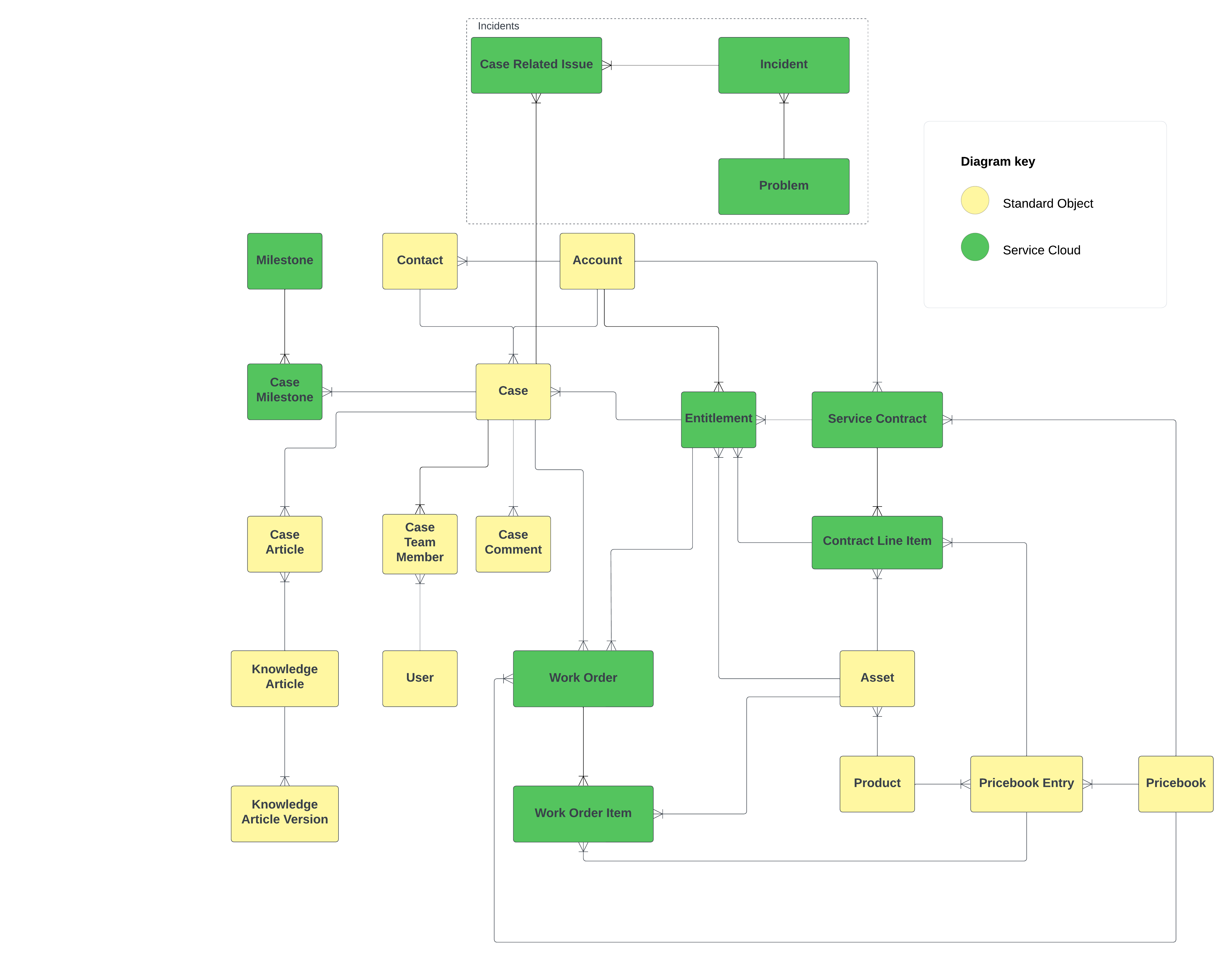
Data Model
Overview
Routing
Omnichannel
Omni-Channel is a flexible, customizable feature, and you can configure it declaratively—that is, without writing code. Use Omni-Channel to manage the priority of work items, which makes it a cinch to route important work items to agents quickly.\ Manage your agents’ capacity to take on work items so that they’re given only the number of assignments that they can handle. You can also define which agents can work on different types of assignments.
Assignment Rules
Assignment rules automate your organization’s lead generation and support processes.\ Use lead assignment rules to specify how leads are assigned to users or queues. Use case assignment rules to determine how cases are assigned to users or put into queues.
Auto-Response Rules
Create auto-response rules for leads captured through a Web-to-Lead form and for cases submitted through a self-service portal, customer portal, web-to-case form, email-to-case message, and on-demand email-to-case message.
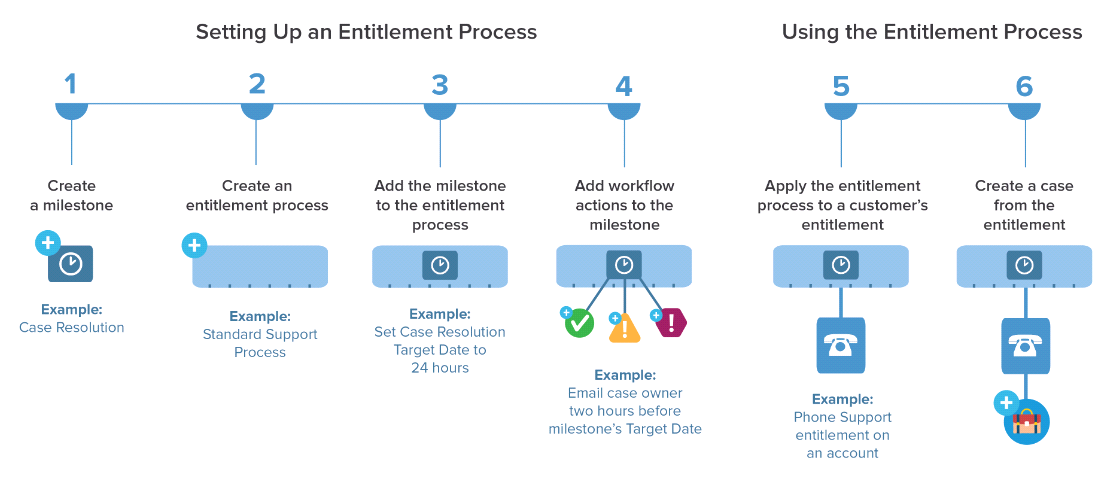
Entitlement & Milestones
Escalation Rules
Escalation rules automatically escalate cases when the case meets the criteria defined in the rule entry.
Limits for Assignment, Auto-Response, and Escalation Rules
Salesforce limits the number of rules, as well as the number of entries and actions per rule, for assignment rules, auto-response rules, and escalation rules.
| LIMIT | VALUE |
|---|---|
| Total rules across objects | 2k |
| Active rules per object | 50 |
| Total rules per object | 500 |
| Entries per rule | 3k |
| Formula criteria entries per rule | 300 |
| Filter criteria per rule entry | 25 |
| Actions allowed per rule | 200 |
Solution for specific scenario
Turn Social Media Posts into Cases
Social Customer Service automatically creates cases for social media mentions, posts, or direct messages from your company’s Facebook, Twitter, YouTube, and Instagram pages.
Requirement: You need at least 1 Social Cloud license (Marketing Cloud)
(This will be retired end of 2024 !!!)