Data Migration
During data migration, it's recommended to follow this flow:
-
Data Extraction & Data Cleaning
- Connect the system to your ETL (Extract, Transform, Load) tool.
- Clean, Deduplicate, Enrich, and Standardize data.
-
Data Transformation & Verification
- Transform data to fit the Salesforce Schema.
- Define External IDs for proper data mapping.
-
Data Loading
- Group records by parents to avoid record locking during insertion.
- Temporarily disable sharing settings.
- Disable Flow, Trigger, and automation.
- Enable defer sharing (Contact Salesforce).
- Utilize Bulk API 2.0 for efficient parallel data loading.
-
After Load
- Re-enable sharing settings.
- Enable Flow, Trigger, and automation.
- Disable defer sharing (Contact Salesforce).
- Recalculate sharing settings.
- Perform data integrity verification.
- Re-enable sharing settings.
Artefact
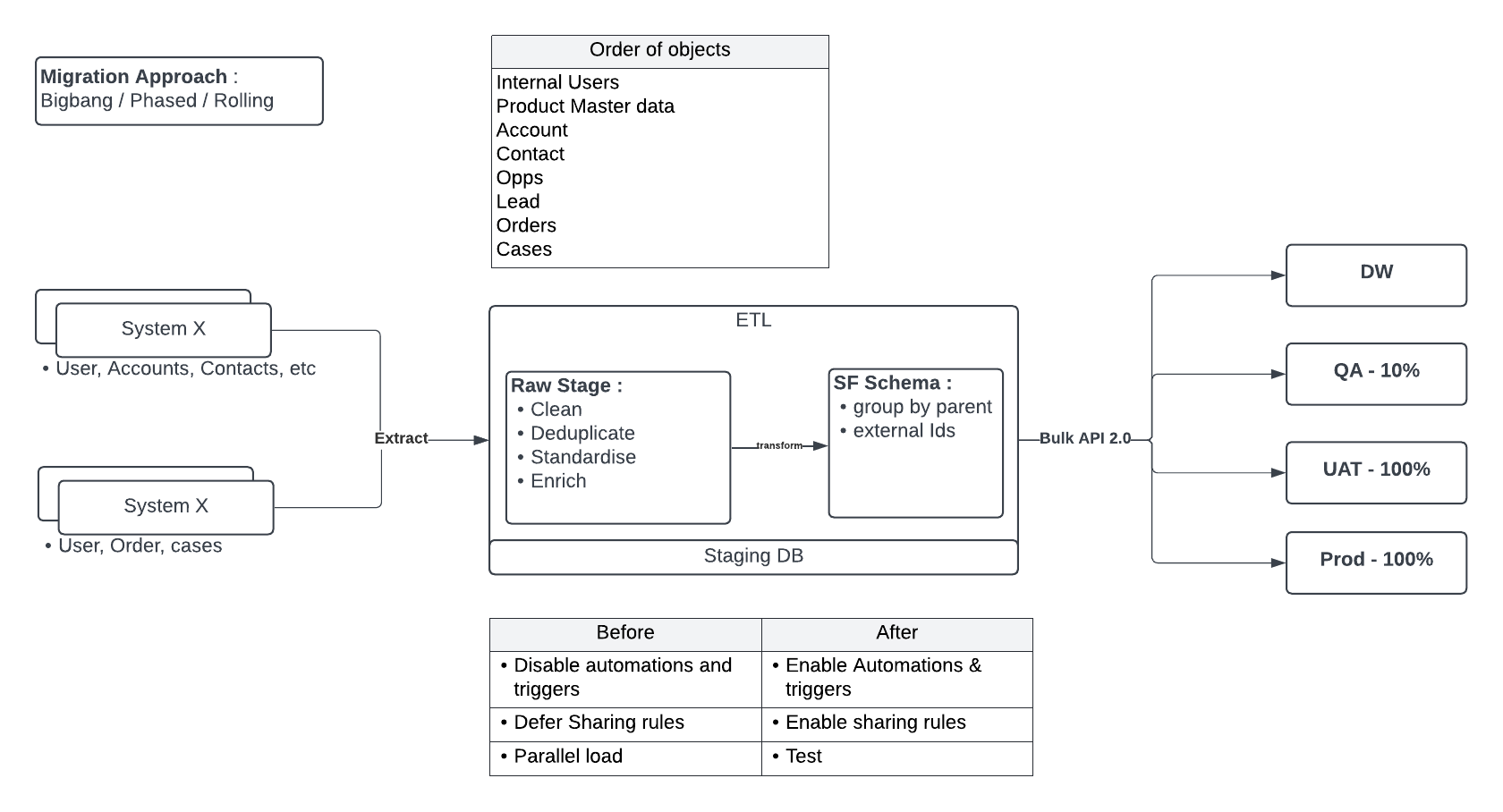
Migration Approach
1. Big Bang Migration
- Description: All data is migrated in a single, large event.
- Pros:
- Simpler to plan and execute
- Shorter transition period
- Cons:
- High risk
- Long downtime
- Potential for significant issues if something goes wrong
2. Phased Migration (Incremental)
- Description: Data is migrated in phases or batches over a period of time.
- Pros:
- Lower risk
- Easier to manage
- Less downtime
- Cons:
- More complex to plan
- Potential for data consistency issues between old and new systems
3. Rolling Migration
- Description: The migration is performed in a continuous, sequential manner, often across different segments or parts of the system. The process rolls through different parts of the data or system in succession.
- Pros:
- Minimal downtime
- Reduced risk
- Flexibility to make adjustments during the migration
- Cons:
- More complex to plan
- Resource-intensive
- May require additional resources to manage overlapping operations